You’re a freelancer. You bill by the day. At the end of every month, somebody has to produce the document that says which days those were. Most time-tracking apps are built for teams: seats, managers, approval workflows. All I need is that monthly report, as a PDF I can attach to an invoice.
That’s what Presto does. This post first described Presto 1, which ran on PostgreSQL with user accounts. It now covers Presto 2, a rewrite: what it does, how an AI agent can fill in the month for me, and how to run it.
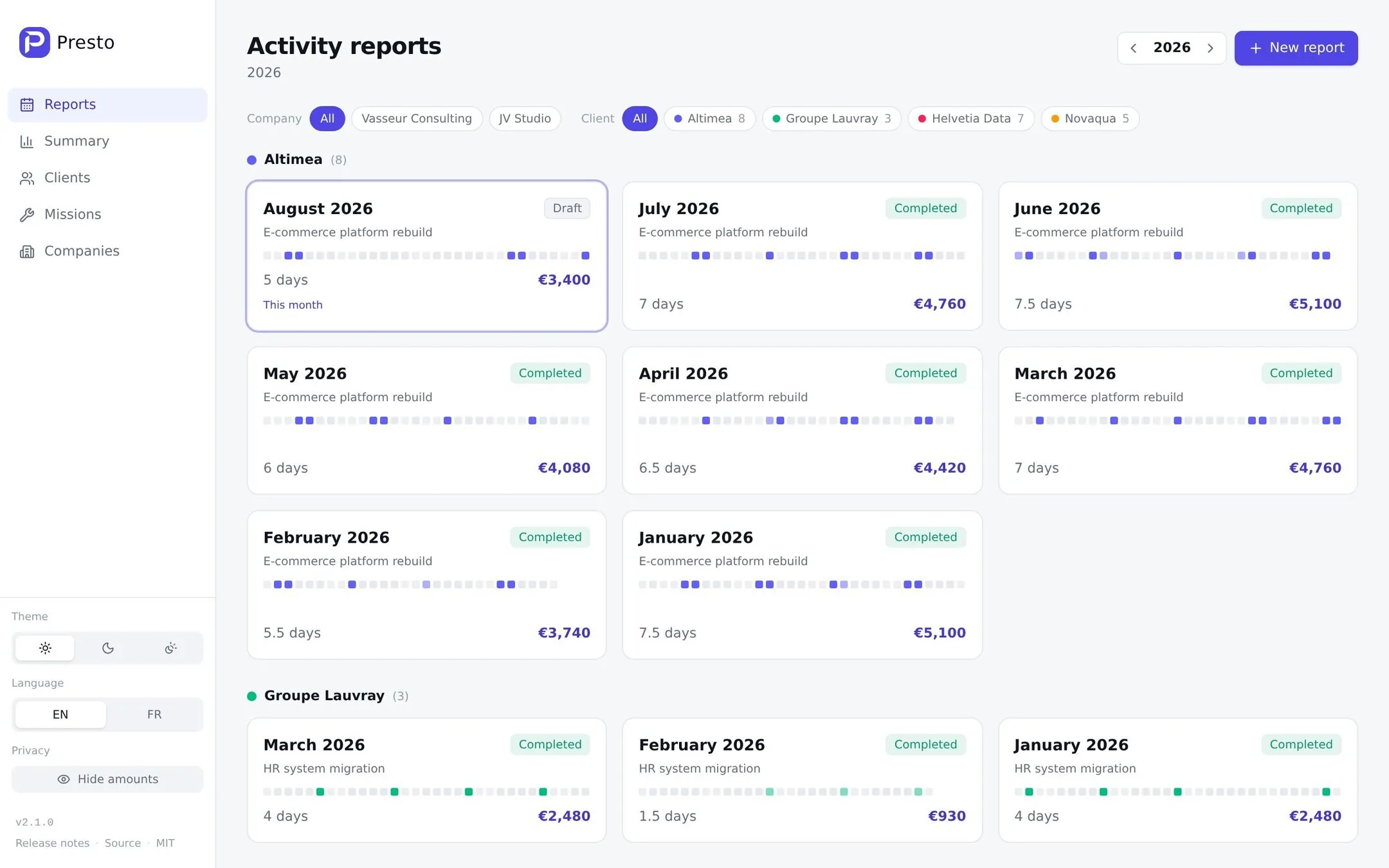
All the data is one SQLite file
Presto 2 has no accounts, no login, no cloud and no telemetry. All the data is one SQLite file that I can copy, move and back up myself. There is no database server to run and nothing to configure: every setting has a default, and the app starts without a .env file.
The data has four parts. A company is the legal entity the work is billed through, the name that appears on the PDF. A client carries a billing currency and a public-holiday country. A mission is the work done for a client, at a daily rate. A report is one mission for one month.
A month is a calendar you click
The editor is a calendar. A click cycles a day through empty, half day and full day. Half days are drawn as a diagonal split, so the shape of a month reads at a glance without any numbers.
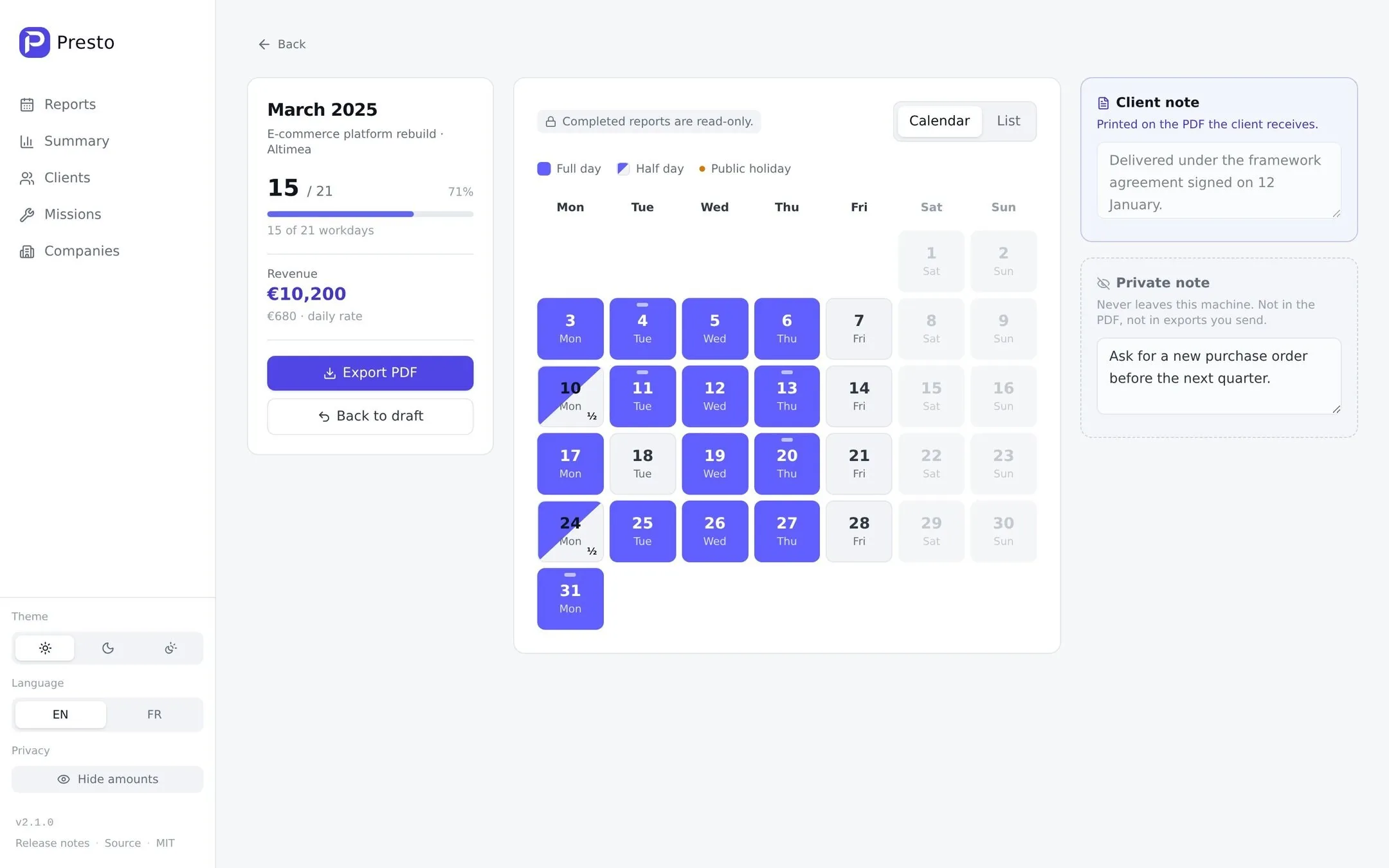
Two buttons do most of the work. Fill workdays marks every weekday, skipping weekends and the client’s public holidays. Copy last month copies the rhythm, not the dates: if I worked Mondays to Thursdays in March, every Monday to Thursday of April gets filled, minus April’s own holidays.
Public holidays come from the client’s country through the date-holidays library, and Presto asks before letting me bill one. The arrow keys move between days, Space cycles one, and N jumps to that day’s note.
When the month is final, I mark the report completed. It becomes read-only. Going back to draft is possible, but Presto asks first, since the client may already have the PDF.
Each report has two notes, and the editor keeps them visually apart. The client note is printed on the PDF. The private note stays in the database: never in the PDF, never in a client-facing export.
The PDF is the document the client gets
The PDF is rendered on the server with React PDF, one page per month, in English or French. It carries my legal entity and its business ID, the client and its business ID, the mission, every day with its notes, public holidays by name, and the total number of days.
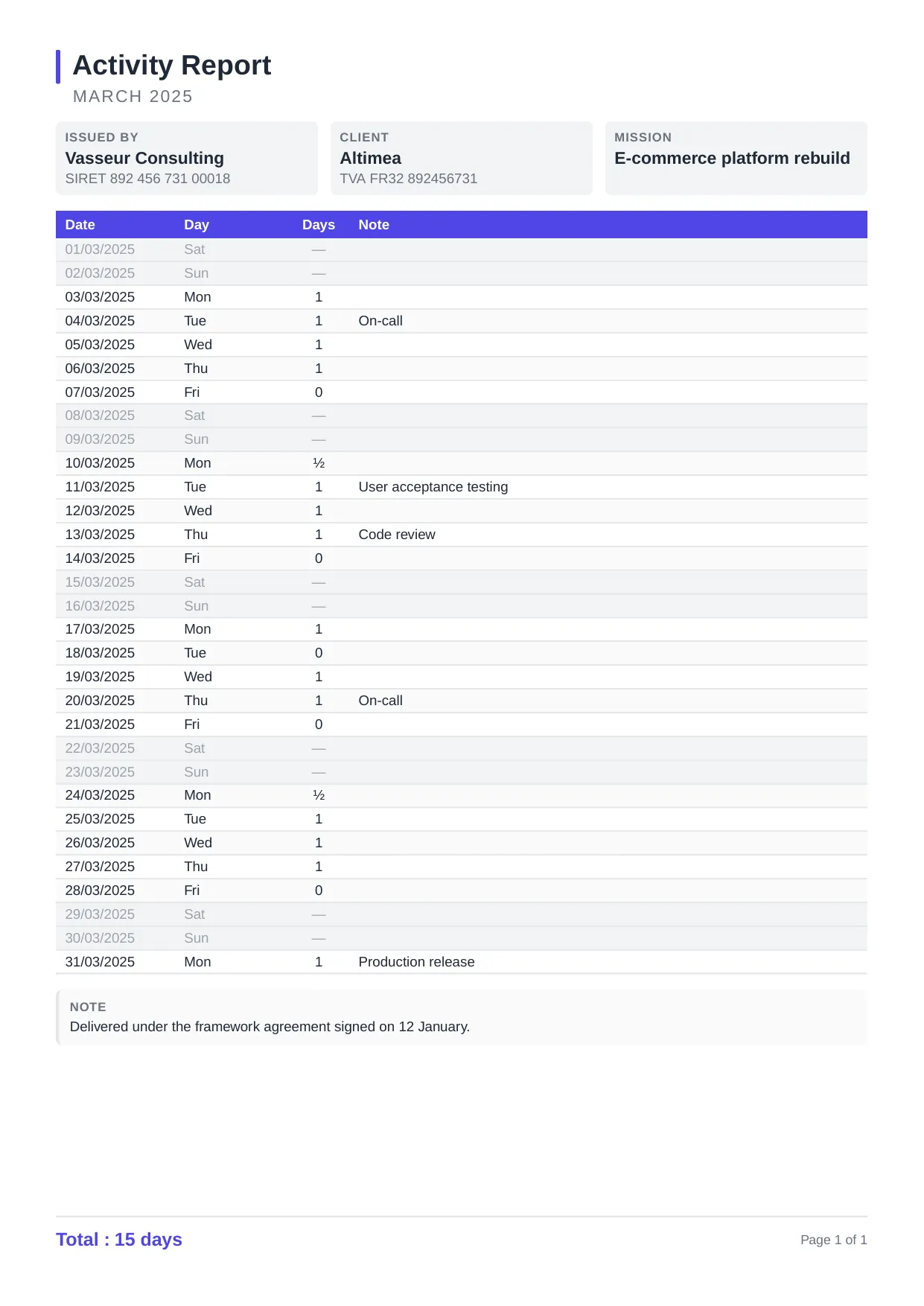
Presto refuses to export a draft. A half-filled month is almost always a mistake, and completing it is one click.
The year, per currency and never converted
The summary page shows days billed, revenue, the average daily rate, and utilization against the working days in the year, per client and per legal entity.
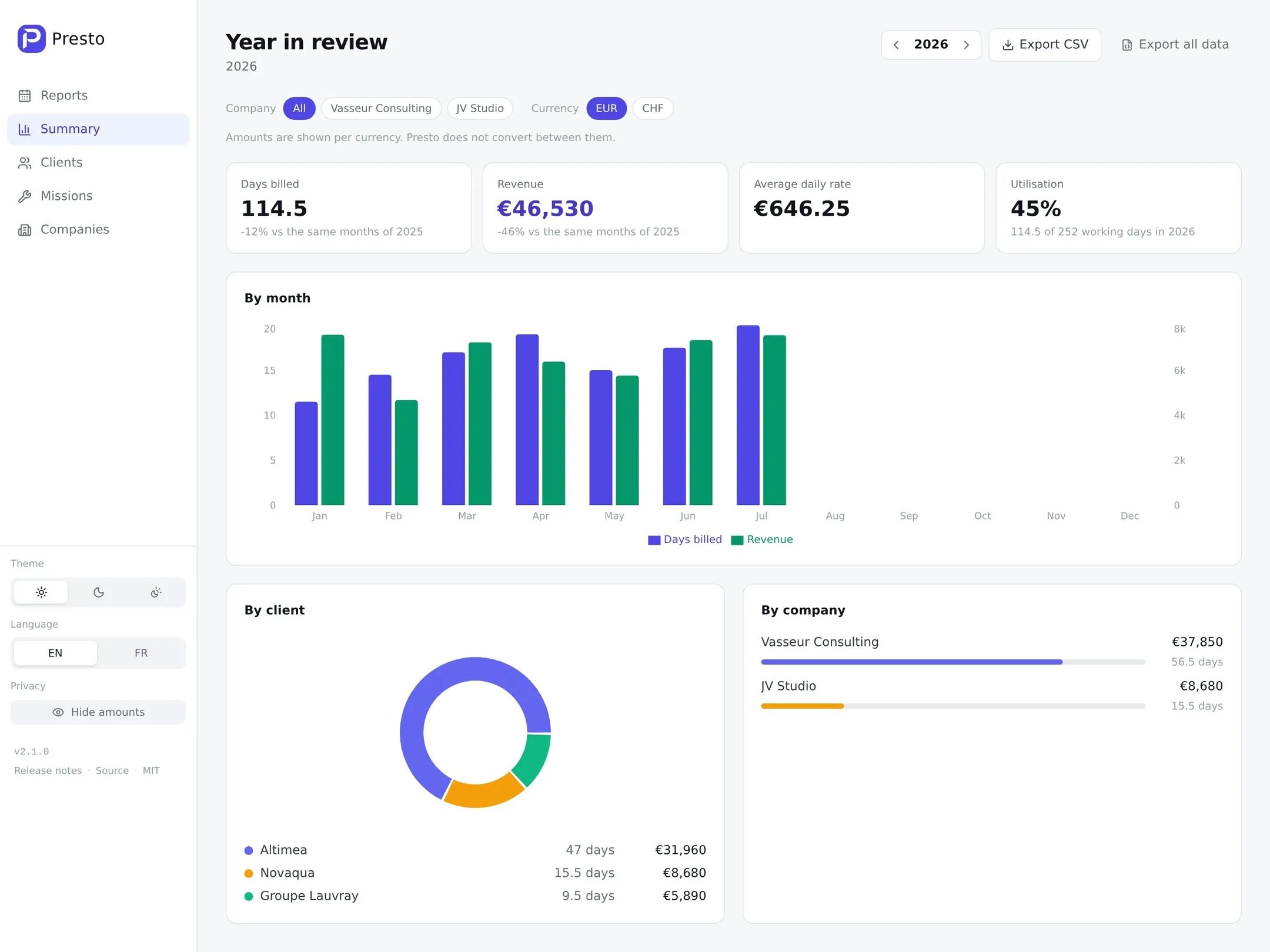
A year still in progress is compared with the same months of the previous year, not with a full twelve: eight months of work is not a drop of a third.
Presto 1 converted every currency with live exchange rates. Presto 2 doesn’t: amounts are grouped per currency and shown as they were billed. Each report’s amount is rounded to the cent, half up, so 16.5 days at 660.25 is 10,894.13.
The year exports as CSV for an accountant, and the whole database as JSON, readable without SQLite. A privacy toggle blurs every amount for screen sharing, while days and the shape of the charts stay readable.
An AI agent can run the month end
Presto speaks the Model Context Protocol (MCP), so Claude, Cursor, Codex, VS Code or any other MCP client can drive it. The end of the month becomes one sentence:
Fill May for Globex, I was off on the 14th and only worked the morning of the 22nd. Then complete it and save the PDF in French to ~/Documents/CRA.
The agent first reads the companies, clients, missions and reports, so I talk about clients and months, never internal ids. It is told the domain’s rules when it connects: what a day is worth, that a completed report is frozen, that the client note goes on the PDF and the private note never does. It is also told to confirm with me before billing a public holiday or deleting anything.
Asking questions works as well as giving orders:
- “Did I bill a public holiday or a weekend anywhere this year?”
- “Which missions have no report yet for this month?”
- “How much did I bill per client, and what is my average daily rate?”
- “Mark these days on the March report”, with a timesheet pasted from a client email.
There are 17 tools, and together they cover everything the web UI does: reports, clients, missions, companies, the yearly summary, and the PDF, CSV and JSON exports. Every tool goes through the same REST API as the browser, inside the same process, so the rules live in one place. A completed report refuses changes until it is back in draft, a draft refuses to become a PDF, and a client still used by a mission refuses to be deleted.
Each tool tells the client whether it only reads, writes, or destroys, and delete is the only destructive one. So an MCP client can ask me to confirm deletes every time while letting the agent read and fill reports freely. The exports can write straight to disk, but only on the local server, and never over an existing file.
There are two ways to connect. On the same machine, the client starts Presto’s MCP server itself as a subprocess and talks to it over stdio: it opens the database file directly, listens on no port, and needs no token.
claude mcp add presto -- bun /path/to/presto/src/server/stdio.tsOn a server, Presto answers MCP over HTTP on /mcp. Setting PRESTO_TOKEN makes that endpoint require the token in every request, and it refuses calls made from another site’s web page, so a page open in my browser cannot drive a Presto on localhost. The token protects /mcp only, not the web UI.
Two limits. Hosted chat apps such as claude.ai and ChatGPT only connect to servers that support OAuth, and Presto doesn’t, so it works with desktop apps and coding agents. And Presto sends nothing anywhere, but a cloud-hosted model sees whatever its tools read, private note included. The agent guide has the configuration for each client and the full tool list.
Run it as one container
docker run -d --name presto \
  -p 127.0.0.1:8080:8080 \
  -v presto-data:/data \
  ghcr.io/tux86/presto:latest
Presto has no login, so anyone who can reach the port can read and change everything: keep it on localhost, as above, or behind a VPN or a reverse proxy that handles access.
One container and one volume, with no database service, because the database is a file. The image is built for linux/amd64 and linux/arm64 and runs as a non-root user. The server is a single bundled file, so the runtime image carries no node_modules. Without Docker, it’s bun install and bun start from a clone, with Bun as the only prerequisite.
bun run backup writes a consistent copy of the database with SQLite’s VACUUM INTO, which a plain cp of a running database in WAL mode does not guarantee.
I run Presto in my homelab, next to the other apps I self-host.
Under the hood
- Runtime: Bun, running TypeScript directly
- Server: Hono, with raw SQL against
bun:sqliteand no ORM - Frontend: React 19, Vite, Tailwind CSS 4, Recharts
- PDF: React PDF, rendered on the server
- MCP: written by hand, about 400 lines with no SDK: tools only, stateless, JSON in and JSON out
- Tests: about 190, with no database server needed
All the logic that can get an invoice wrong (calendars, holidays, totals, the yearly rollup, the CSV) lives in one folder that imports nothing from the database, the server or the UI. That’s what lets it be tested without them, and it’s where nearly all the tests point.
A bundled server with no node_modules can break in a way the tests miss, since they run from the source tree. It did: a dependency update made the PDF library load its fonts at runtime, and two releases shipped an image that crashed on start while every test passed. The release workflow now starts the built image and has it render a PDF in both languages before anything is published.
Who it’s for, and who it isn’t
Presto fits a freelancer or consultant who bills by the day, sends a monthly activity report, and is fine running a container or a Bun app. It has no accounts, no teams and no invoicing, and pull requests that add them are declined.
The code is on GitHub under the MIT license, and the image is on the GitHub Container Registry.