
 Walid Karray
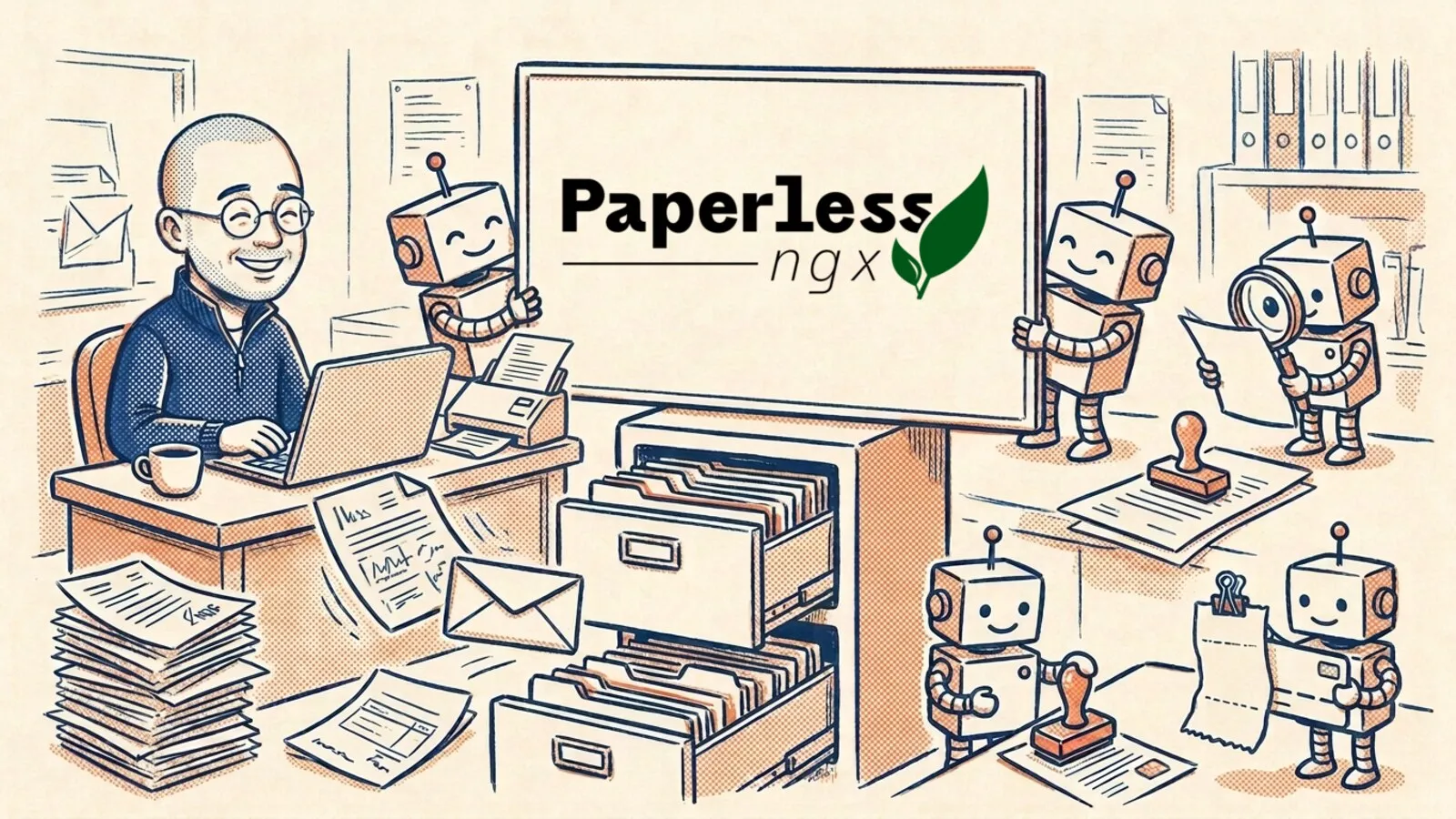
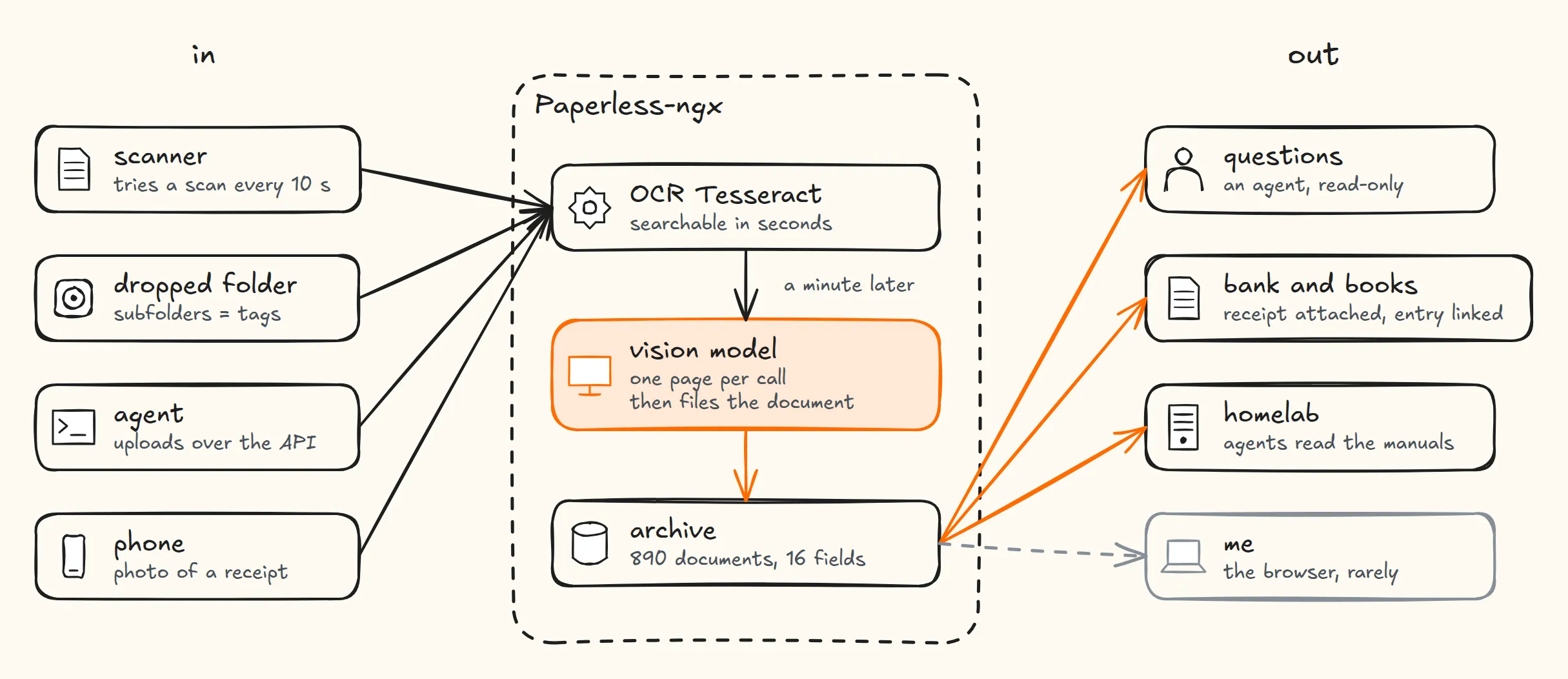
An invoice shows up: a PDF in an email, a photo of a receipt, now and then a sheet of paper I feed to the scanner. A minute later a vision model has read the supplier, the date and the amount. Then an agent finds the matching transaction on my company’s bank account, shows me the match, and once I say yes it attaches the invoice to that transaction and links it to its entry in my books. I didn’t rename a file, open the banking app or type an amount.
My archive holds 890 documents: payslips, birth and marriage certificates, medical reports, contracts, expense receipts, company invoices. I no longer browse it. One agent files what comes in, another answers questions about what’s already there, and each one can touch only what it needs.
Nobody files anything, on purpose
Paperless-ngx is a self-hosted document archive: it extracts the text from PDFs and images and keeps them searchable. Mine runs in my homelab, reachable only over Tailscale, with no port open to the internet.
The first thing I did was turn off Paperless’s built-in classifier. It learns from documents you have already filed, which works for a supplier you’ve seen fifty times. Faced with an issuer it has never seen, it guesses, and nothing takes the guess back. A personal archive is full of one-off issuers: a town hall, a notary, a doctor’s office.
A vision model does the filing instead. It re-reads each document a minute after it arrives, page by page, and picks the type, the tags and the issuer from the lists that already exist. The agents never use the web interface: they talk to Paperless through its API or an MCP server, with permissions cut down to what each one needs.
Four ways in, none of them involves sorting
The scanner: trying to scan is the paper sensor
My scanner, a Brother DS-640, is plugged into the server over USB. It has no paper sensor I can read and no status button, so the scan attempt itself is the sensor.
A shell script, lab-autofeed (the entry point of the scanservjs container), runs scanimage every ten seconds, in color at 300 dpi, with --AutoDocumentSize, --AutoDeskew and --SkipBlankPage:
- Empty feeder: the SANE driver answers “out of documents” and the script waits ten seconds.
- A sheet in the feeder: the scan goes to a temporary
._scan_…pdf, which Paperless ignores, then gets renamed once it’s complete, so a half-written file is never ingested. - Scanner held by the web UI: the driver answers
Device busyand the script waits fifteen seconds. Paper jams are written to the log. - USB sleep: when the scanner drops off the bus and comes back under a new number, the script finds it again and asks
scanimage -Lfor its new name.
A file named autofeed.pause stops the loop. The one physical catch: after a power cut, someone has to wake the scanner by hand. Day to day, I slide a sheet in, it gets pulled through within ten seconds, and it lands in the archive.
The phone: the Android app over a private network
For a receipt or a letter I get while I’m out, the Paperless Android app connects over Tailscale with an API token. When a receipt has no printed date, the vision script takes the moment the photo was shot from its EXIF data (exif_capture_date).
A dropped folder, and the agents’ API
For a batch of old files, I drop the whole directory tree into the folder Paperless watches: every subfolder becomes a tag, and duplicates are refused. For company paperwork, the agents upload straight through the REST API.
Two reads: a fast index, then a faithful one
Tesseract, so search works right away
As soon as a document arrives, Tesseract extracts the raw text in French, English and Arabic, and the document is searchable within seconds. But Tesseract doesn’t understand structure. On handwriting, a crumpled receipt or a poor scan it produces noise: good enough to find a keyword, not good enough to pull out fields you can trust.
The vision model, in the background, one page at a time
When the Paperless container starts, /custom-cont-init.d/50-vision.sh launches a loop in the background as the paperless user:
while :; do python3 /opt/vision/paperless-vision.py --pending --apply; sleep 60; doneThe script is 894 lines of Python and works directly through Paperless’s Django ORM, not the REST API. --pending picks the documents that have no vision custom field yet, or that were read under an older version of the instructions. It reads four pages in parallel and one document at a time.
The rule that matters most fits on one line: one page per call, never a whole document. On a 28-page bank statement, sending the whole file made the model condense: it returned 43 characters per page, against 2,568 for Tesseract. It summarized without saying so, to cope with the load.
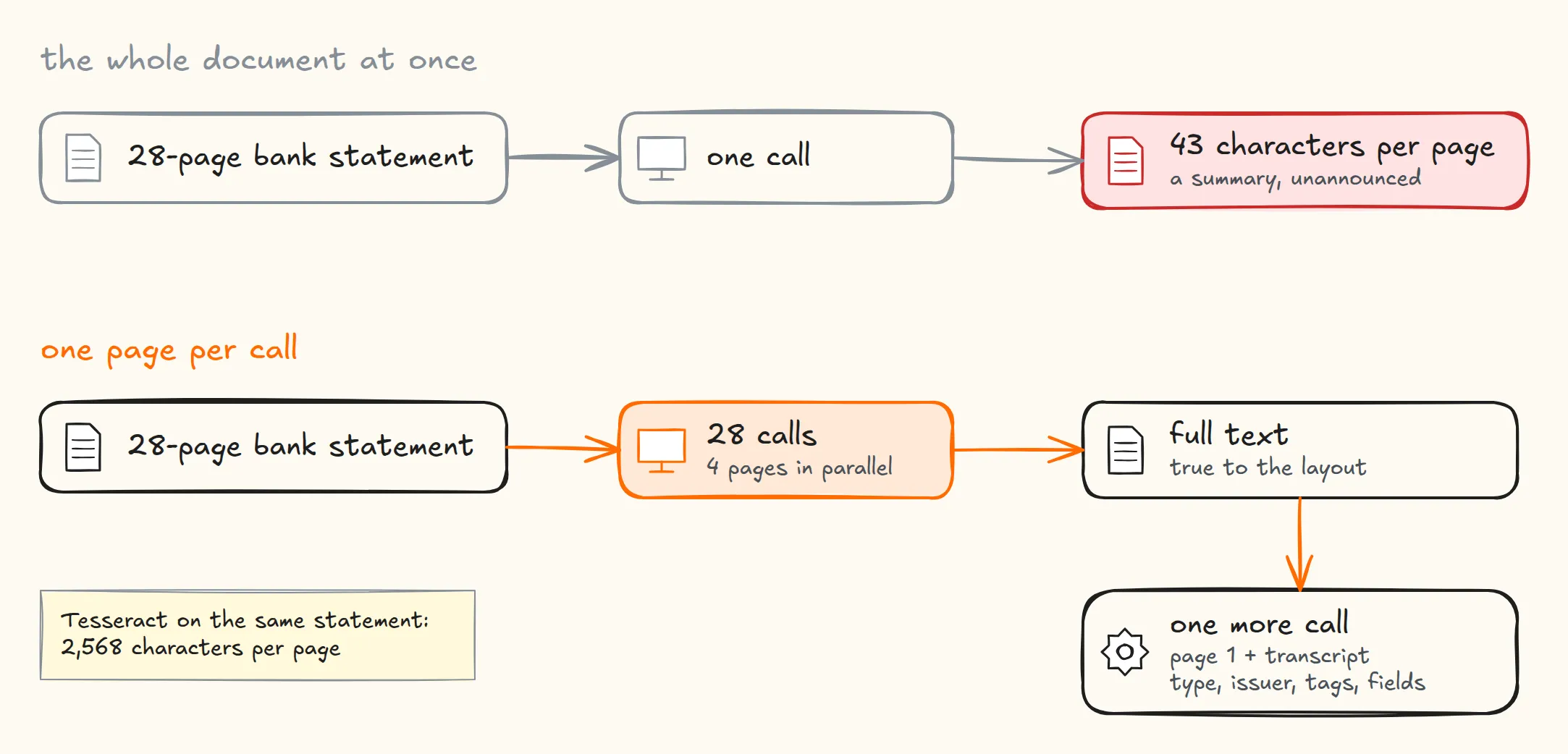
So the script splits the PDF: 28 calls, four at a time, each transcribing one page with google/gemini-3.1-flash-lite through OpenRouter. It’s also the model behind Paperless’s own AI features, where gemini-2.5-flash-lite used to hang on one of the calls.
The transcription prompt runs at temperature 0, asks for strict JSON ({"texte": "..."}), and is written in French because the archive is. It carries four instructions:
- Everything, faithfully: render all the readable content of the page in French, in full, not a summary. A page in another language is translated.
- Data copied, never rewritten: numbers, dates, amounts, IDs, references and proper names are reproduced exactly, neither translated nor reworded. Nothing is invented, and
[illisible]marks what can’t be read. - The page’s own layout: running text stays running text, a table stays a table, a form keeps its label-value pairs. Never join what the page keeps apart, never split what it keeps together, and leave anything ambiguous on its own. On a blood test with 49 values, without this clause none of the numbers kept their line neighbors across 20 runs; with it, 68% did.
- Blank pages: answer exactly
{"texte": "[page vierge]"}for a page with no text, and never return empty text for a page with ink on it.
Blank-page detection also relies on counting non-white pixels:
- Under 0.1% ink, the page is declared blank without any API call.
- Over 2% ink, a “blank” answer from the model is rejected and the page is read again.
- After three “blank” answers in a row on an inked page, the script accepts it: a photo, a stamp, a background with no text.
A second prompt gets the first page and the full transcript and fills in the type, the issuer, the person the document is about and the date it was issued. It picks from the existing lists or returns null; choosing the nearest match is forbidden. A field I’ve edited by hand in the UI is never overwritten again. The script gives up on a document after three failures, and stops for the day once spending passes $10.
The archive became a database
Paperless lets you attach custom fields to documents. I have sixteen, and eight of them carry most of the automation:
| Field | What it holds |
|---|---|
montant | the total of an invoice, a receipt, a payslip, a statement (614 documents) |
reference | invoice, contract or case number, copied verbatim (709) |
echeance, periode | what the issue date doesn’t say: valid until when, for which month (170 due dates) |
signe, cachet | whether a signature or an official stamp is on the page, as the vision model sees it |
qualite | pages worth scanning again |
ocr_ecart | numbers Tesseract saw that are missing from the vision model’s transcript |
The field names are French because I am. montant is the amount, echeance the due date, signe “signed”.
ocr_ecart is the safety net I rely on most. A model’s worst failure isn’t an obvious hallucination; it’s a correct number on the wrong line. The script collects the numbers Tesseract saw and checks them against the vision transcript: when an amount the OCR caught is missing from the model’s text, the gap goes into ocr_ecart and the document is flagged for a look.
The paper trail of my company
I work as a freelancer through my own one-person company. A dedicated Git repository holds the agent’s instructions and scripts. Everything I receive (invoices, receipts, contracts, screenshots of emails) goes unsorted into an inbox folder, 00_A_TRAITER/ (“to process”).
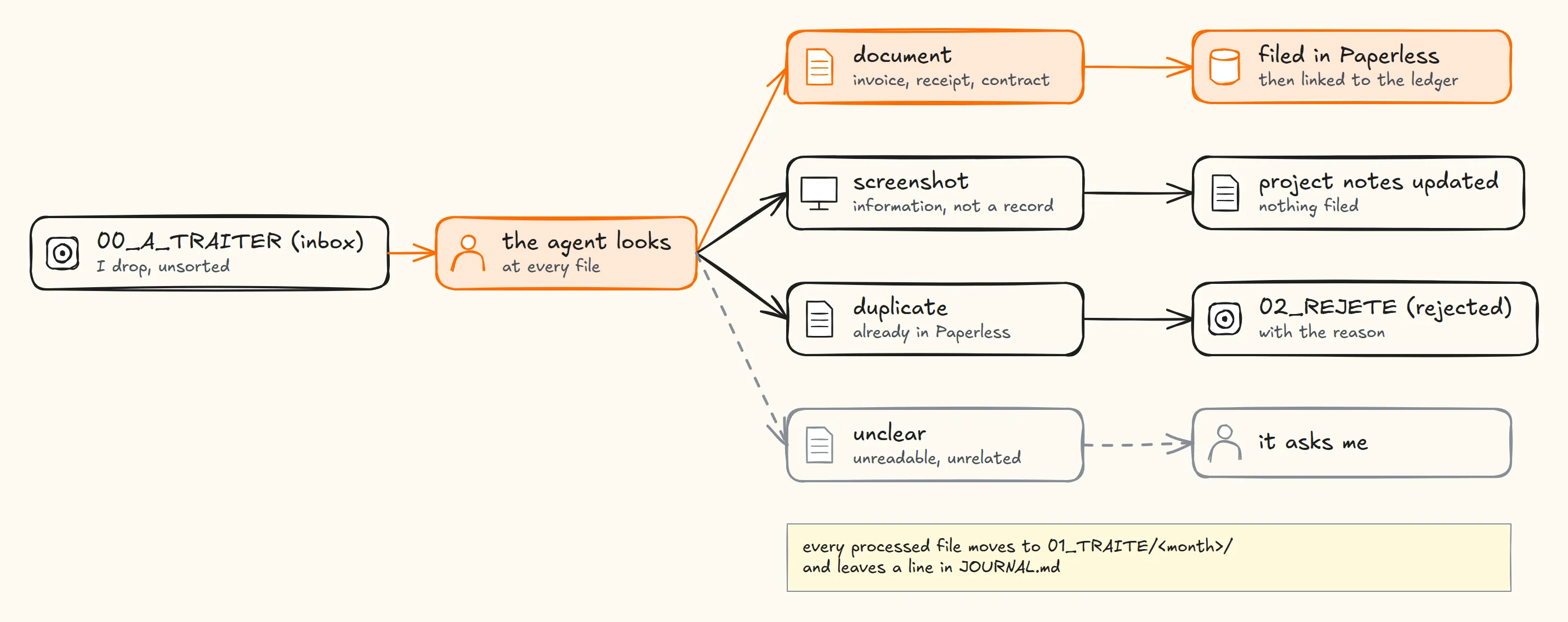
The agent decides what each file is before doing anything:
- A record worth keeping goes into Paperless.
- A screenshot updates the project’s notes and isn’t archived.
- A duplicate goes to
02_REJETE/(“already in Paperless, doc 355”). - Anything unclear turns into a question for me.
Each processed file moves to 01_TRAITE/<month>/ and gets a line in a journal once Paperless has confirmed it stored it.
From a document to a receipt on the bank transaction, over MCP
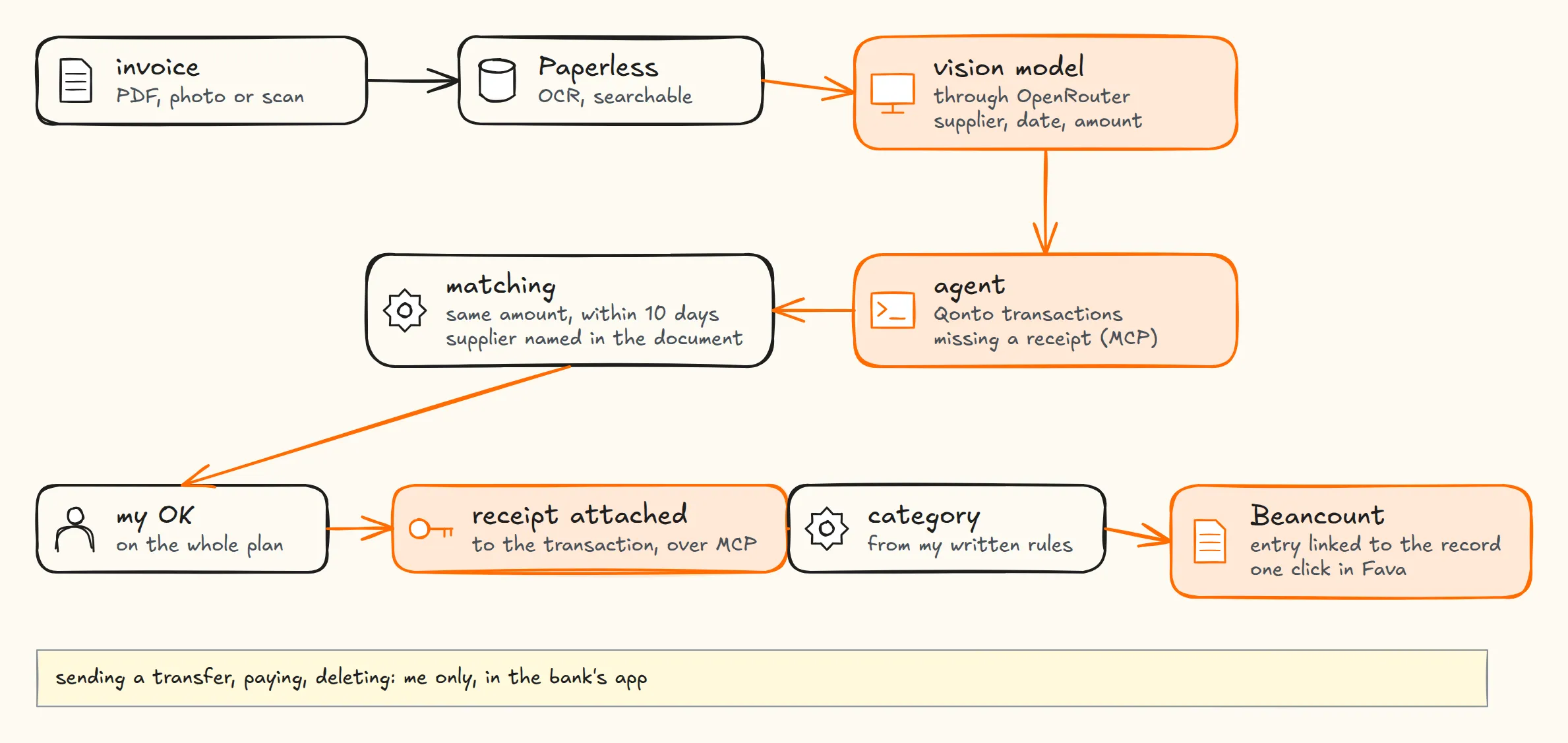
The company banks with Qonto, a European business bank that ships an official MCP server. The agent lists the transactions that still lack a receipt and matches each document on three criteria: the same amount, a date within ten days, and the supplier’s name appearing in the document. That last one matters more than it looks. Without it, a €180 invoice would happily attach itself to any unrelated €180 direct debit.
The agent shows me its full plan and waits for my OK. Once I give it, it asks Qonto for a temporary upload URL (valid fifteen minutes), uploads the file, attaches it to the transaction and sets the accounting category from rules I wrote. The agent is not allowed to send a transfer, pay a supplier or delete anything. That’s a written instruction, not a technical lock, and those actions stay mine, in the banking app, where the agent only hands me a direct link.
Paperless as the backbone of the Beancount books
Paperless is the single source for every record. The 113 invoices that only existed in Qonto were pulled back into it. Each entry in my Beancount ledger carries the Paperless link to its record (199 entries linked), one click away in Fava, Beancount’s web interface.
The monthly check lists the transactions that have no record. Expense reports become mechanical: of 143 restaurant receipts, the ones for two people or more go to business meals, a receipt for one is my own meal as the company’s director. Mileage allowances are computed from the logged trips and the government’s per-kilometer rate. The expense report is a query over records that were already checked.
Personal documents: asking instead of digging
For my personal papers, the agent combines custom fields rather than running a plain full-text search:
- “Is my copy of the lease signed?” It filters on the
bail(lease) tag, checkssigne, and links the signed copy without opening a PDF. - “What expires in the next three months?” A query on
echeancelists insurance, warranties and subscriptions. - “How much did I pay for electricity this year, month by month?” It sums
montantper month into a table and warns me ifocr_ecartflagged a mismatch. - “Put together a rental application: last three payslips, last tax notice and an ID.” It picks the documents and merges them into one PDF with Gotenberg, which already runs alongside Paperless.
- “Find my last blood test.” The table keeps its alignment, so the values can be compared year to year.
The homelab benefits too: the UPS’s manual, its datasheet and its declaration of conformity are tagged homelab in Paperless, and that’s where the maintenance agents go to read them.
Who may touch what
An agent that handles ID documents and tax returns needs clear walls around it.
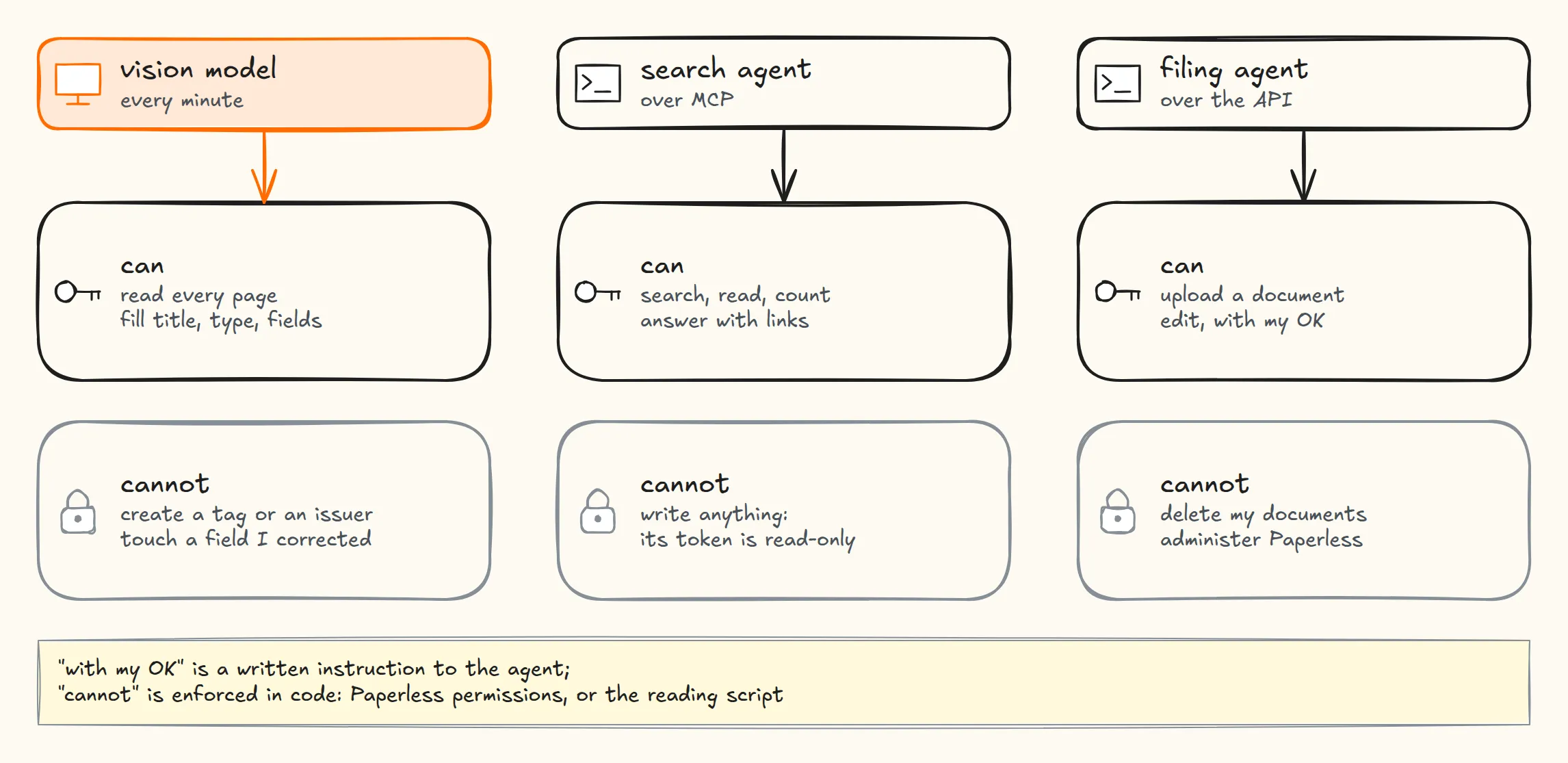
The agents have two dedicated accounts, neither of them an admin. The question-answering agent goes through the MCP server (paperless-mcp) with a strictly read-only token: Paperless refuses every write. The filing agent can create and edit documents but not delete them. The ban on deleting is a Paperless permission; asking me before an edit is a written instruction.
One trap worth knowing: a document that isn’t shared with an account is invisible to it, and Paperless returns no 403. The agent just sees fewer results and can get a total wrong without noticing. So an automation rule shares every new document with the agents’ accounts the moment it arrives.
Twelve models on the same pages: accuracy and real cost
To check my choice, I put google/gemini-3.1-flash-lite up against eleven other models on OpenRouter, with the same instructions, one page per call. The test set was eleven pages from the archive (receipts, invoices, datasheets): 132 calls for $0.86.
Accuracy is measured on numbers. A number that at least half the models read is treated as correct, each model is scored on how many of these consensus numbers it recovers, and a number only one model saw counts as invented.
| Model | Numbers recovered | Invented | Cost per 1,000 pages | Seconds per page |
|---|---|---|---|---|
google/gemini-3-flash-preview | 99.1% | 1 | $3.06 | 3.4 |
google/gemini-3.1-pro-preview | 98.6% | 0 | $11.19 | 7.0 |
anthropic/claude-sonnet-5.5 | 98.2% | 0 | $14.81 | 4.9 |
google/gemini-3.1-flash-lite (my pick) | 97.3% | 3 | $1.50 | 2.7 |
anthropic/claude-haiku-5.5 | 97.3% | 2 | $1.39 | 6.2 |
openai/gpt-6-luna-20260922 | 96.4% | 5 | $1.05 | 10.1 |
qwen/qwen3-vl-235b-a22b-instruct | 95.9% | 3 | $1.49 | 9.1 |
qwen/qwen3-vl-30b-a3b-instruct | 92.8% | 4 | $0.95 | 11.2 |
google/gemini-2.5-flash-lite | 92.3% | 7 | $0.56 | 2.0 |
google/gemini-3.5-flash-lite | 91.0% | 3 | $2.08 | 2.0 |
google/gemini-3.5-flash | 90.5% | 2 | $39.80 | 14.7 |
mistralai/mistral-small-3.2-24b-instruct | 77.9% | 6 | $0.50 | 10.9 |
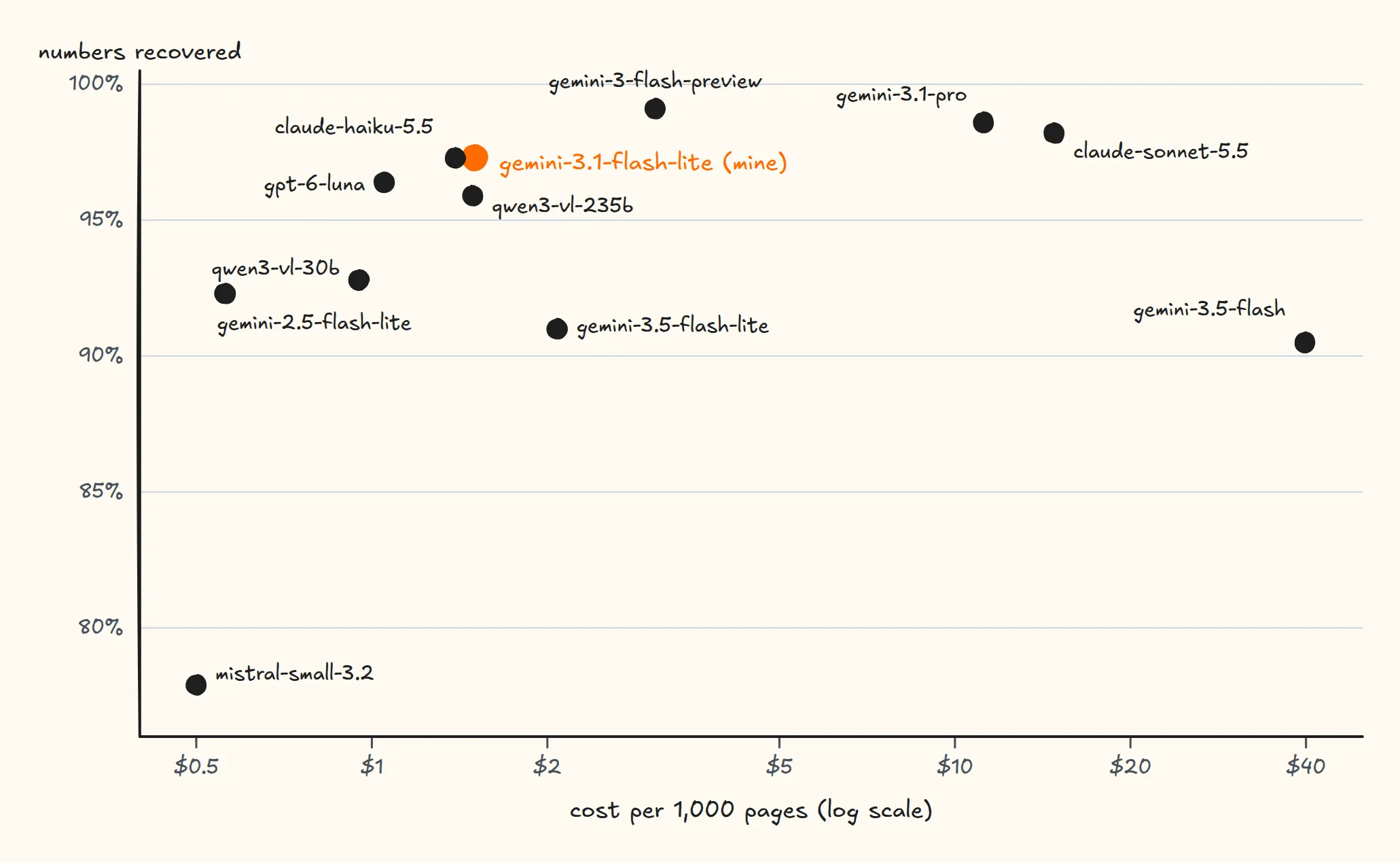
The top of the table is tight: between gemini-3.1-flash-lite at $1.50 per 1,000 pages and Claude Sonnet at $14.81, accuracy moves by about one point for ten times the price. Newer doesn’t mean better either: gemini-3.5-flash-lite does worse than 3.1, and gemini-3.5-flash is both the most expensive model in the set and one of the least accurate.
The worst failures weren’t misread numbers; they were generation loops. On the UPS manual, mistral-small filled its answer with tabs until it hit the 8,000-token limit, without returning a single number. On the second page of an Amazon invoice, almost blank, gemini-3.5-flash produced line break after line break, and billed me for them. That’s why my script caps the length of an answer and retries truncated pages.
On this set, gemini-3-flash-preview comes out first: 99.1% for $3 per 1,000 pages, an extra cost that barely registers for a personal archive. Eleven pages is a small set, with no handwriting and no hard photos, so I read it as a signal rather than a final ranking.
What it costs to run, and where my data goes
In real use, counting retries, blank pages and the filing call, reading the whole archive (890 documents, 2,318 pages) costs about $5, a little over $2 per 1,000 A4 pages. The $10 daily cap keeps a runaway loop from billing all night.
The trade-off is explicit: every page leaves my network as an image, ID documents included, to be read by OpenRouter and the model behind it. The files, the PostgreSQL database and the indexes stay home, but the reading depends on an outside API.
To keep a document out of that flow, I set its vision field by hand before the script gets to it, and the script treats it as already read. I haven’t yet run a local vision model through the same benchmark; until I do, the remote API is my compromise.
From filing cabinet to something I can ask
Manual filing is gone: I drop a document in, and the archive answers questions with links back to the original records.
A human still needs to look at the money. A number on the wrong line looks just as plausible as the right one. The next parts of this chain, the bank side with Qonto’s MCP server and the Beancount books, will get their own posts. The monthly activity report already has one: Activity Reports for Freelancers, Filled In by an AI Agent over MCP.
Cover illustration generated with Gemini 3.1 Flash Image, through OpenRouter; the Paperless-ngx logo belongs to the project.